 AudioBuddy
Ask without losing your place.
A name you can’t place, a word you don’t know, an idea worth talking through. Ask the moment it comes up, then get straight back to the story.
-
Interrupt
Tap Ask, double-tap your headphones, press ⌘K on a Mac, or set it to the iPhone Action button. The book fades out.
-
Ask
Just speak. AudioBuddy hears when you’ve finished. You can also type.
-
Listen
The answer is spoken while it’s still being written, so it starts almost at once. Tap to cut in.
-
Back to the book
Ask a follow-up, or say nothing. The book rewinds to the start of the sentence you were hearing and carries on.
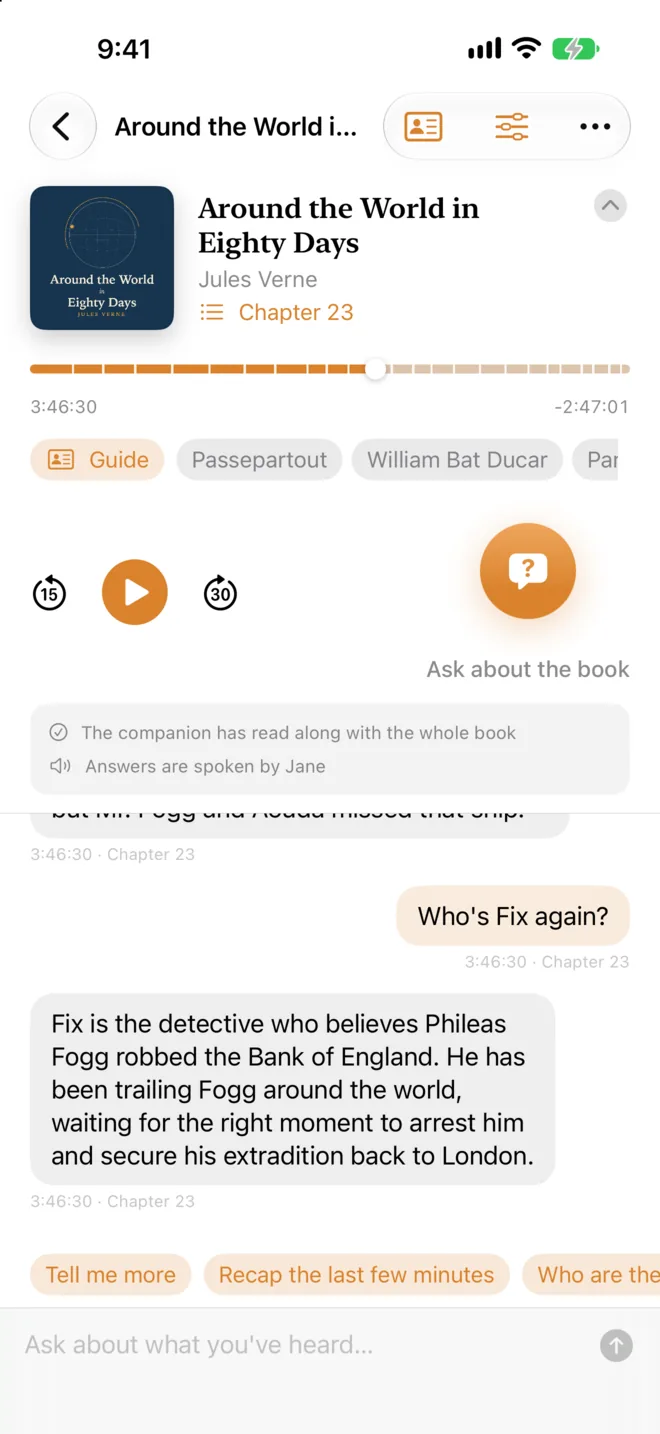
It’s heard exactly as much as you have.
AudioBuddy follows along by transcribing the recording on your device. It starts where you are, so questions work within seconds, even in the middle of a book.
Answers come from what you’ve heard and nothing after it. It can still go beyond the book with history, background and what a word means. And when you don’t mind spoilers, you can let it read the whole thing.
AI can make mistakes. The heard-so-far setting limits what the AI is given, but it can’t guarantee an answer won’t give something away.
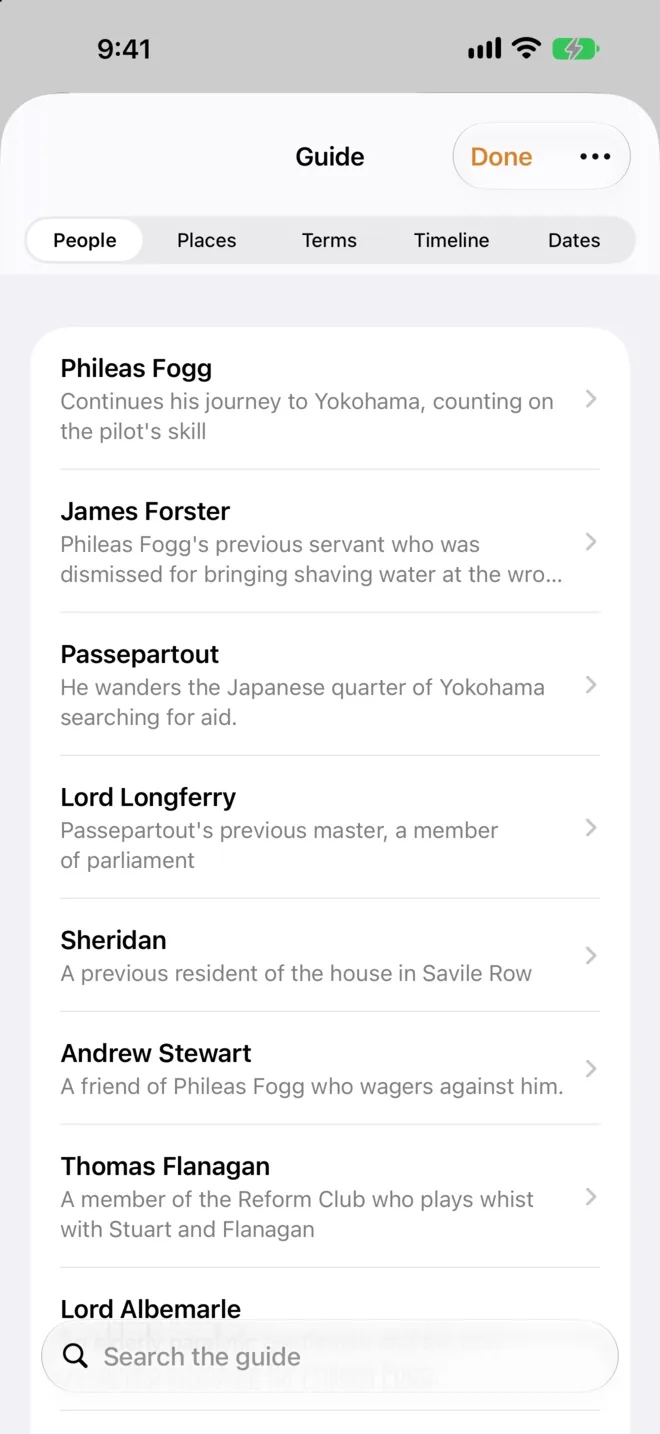
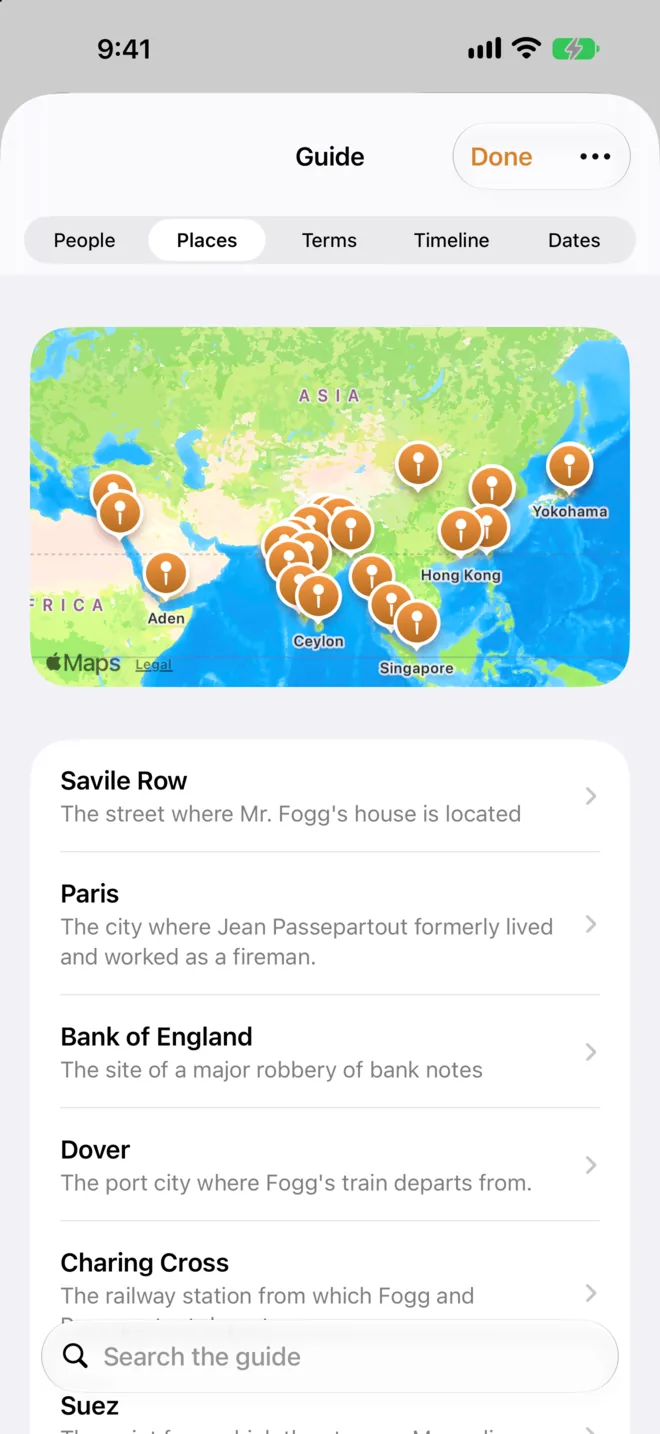
A guide that fills in as you listen.
Every book and episode gets its own guide, written as you go: the people, places and terms you’ve heard, a timeline in the order the book tells it, and every date in the order things actually happened.
Each note remembers where it came from, so the guide only shows what you’ve already heard. Tap a name to look it up, jump to where it came up, or ask about it.
- People
- Places on a map
- Terms
- Timeline
- Dates
Your audiobooks, and any podcast.
Bring the books you already own. AudioBuddy downloads them to your device, chapters and covers included.
- Libro.fm
- Sign in to download the DRM-free audiobooks you’ve bought. Every Libro.fm purchase supports an independent bookstore.
- Audiobookshelf
- Connect your own server, at home or anywhere, to browse, search and download your collection.
- Your own files
- Import M4B, MP3, AAC, FLAC and other audio files, with their chapters and covers.
- Any podcast
- Search Apple’s directory, paste a link, or share an episode from Podcasts or Safari. Show notes help AudioBuddy get names and topics right.
AudioBuddy isn’t affiliated with Libro.fm or Audiobookshelf.
Answers in a natural voice.
English answers are spoken by one of six built-in voices that run right on your device. Other languages use Apple’s voices, including any Enhanced or Premium voices you’ve downloaded.
AudioBuddy speaks as itself. It never imitates a narrator or a host.
Choose how it thinks.
- AudioBuddy Cloud
- Included with Plus. Sign in with Apple; there’s no API key to set up.
- Your own AI service
- Claude, OpenAI or any OpenAI-compatible server, including Ollama or LM Studio on your own network.
- On your device
- Apple’s on-device model, or the free Gemma download for devices without Apple Intelligence. Works offline.
Your library stays on your device.
Audiobooks and transcripts never leave it. When you ask, only your question and the relevant part of the book go to the AI service you chose, and with an on-device model nothing leaves at all. Sign-ins are kept in your Keychain. There are no ads and no tracking.
Free for your first book.
Try everything with one book or podcast episode at a time. Remove it to make room for the next. Upgrade when you want more.
| Plan | Free$0 | Unlimited$9.99 once | Plus$4.99 a month |
|---|---|---|---|
| Books and episodes | One at a time | As many as you like | As many as you like |
| Answers and guides | From an on-device model or your own AI service | From an on-device model or your own AI service | AudioBuddy Cloud, with no API key, or any of the others |
| AudioBuddy Cloud | Not included | Not included | A monthly allowance. A question uses about half a percent; a guide for a 10-hour book about 7%. A $1.99 refill tops it back up any time. |
Bring a question to your next listen.
AudioBuddy needs iOS or iPadOS 26 or later, or macOS 26 or later on a Mac with Apple silicon. Apple’s on-device model needs a device that supports Apple Intelligence.
Get it on the App StoreQuestions? See help and support, or email support@ramifystudios.com.